Ads 468x60px

freak2code is the blog about latest geek news,software reviews ,trends in technology and more informative stuff......

Saturday, 18 August 2012

5 of the Coolest Kids Tablets


5 of the Coolest Kids Tablets 


Barbie Fashion tablet

While most tablets tend to target the male demographic, here is something just for the pink loving princess in your life. I am talking about the Barbie Fashion tablet from Oregon Scientific here, where it has less practicality and functionality than being a fashion icon for the little girl in your life. Similar to the craze surrounding Hello Kitty products, Barbie, being an international fashion icon, has her very own tablet that certainly abhors all things high tech, as it lacks even the most basic necessity these days – a color LCD display. At least the monochrome LCD display is touch sensitive, and it comes with a stylus in addition to a range of learning activities like writing, drawing, music making, vocabulary building, sequencing, and memorizing amongst others.
There is a range of themes that accompany the Barbie Fashion tablet including fashion, design, pets, and parties, not to mention handwriting recognition. Seems to be more of a gift for collectors and fans of Barbie rather than having it being a functional, working tablet, but you cannot really complain much at $49.95.
Full specs over at Oregon Scientific and also available (cheaper) from Amazon.com

Nabi 2 tablet

“Power…unlimited power!” Or so the saying goes when Palpatine announced his identity to Jedi Master Mace Windu through a blast of Force Lightning, after Anakin Skywalker intervened by cutting of Mace’s saber hand. Well, the same can be applied to the tablet market – specifically for little ones out there. The Nabi 2 tablet as it is called is one device that you are able to give to your kids who want to imitate their parents who own “real” tablets. The Nabi 2 allows your little one to play and learn in a meaningful manner, and while the $199 price tag clearly makes this one of the more expensive tablets in the market – even for kids. Basically, if you pay peanuts, you get monkeys, so the amount of money you “invest” into the Nabi 2 would clearly reflect in the device that your kid finally holds in his or her hands, where it sports a 7″ capacitive display at 1,024 x 600 resolution, powered by the Tegra 3 processor and accompanied by 1GB RAM, 8GB of internal memory, a microSD memory card slot, a 2-megapixel camera with 720p resolution recording capability, a mini HDMI output, USB 2.0, Bluetooth and Wi-Fi connectivity.

LeapFrog LeapsterGS tablet

Here is a tablet that you might want to consider getting for your little one if you want to stretch your budget by a whole lot – especially when you hand over a Benjamin for the LeapFrog LeapsterGS, and you will receive $30 in change, thanks to the $69.99 price point slapped onto the LeapFrog LeapsterGS. Targeting the edutainment (education and entertainment) niche, the LeapFrog LeapsterGS will also feature an integrated camera with video recording capability, not to mention throwing in a motion sensor. Not only that, there is also a fair amount of software and apps in its digital library so that your kids are able to get started off on the right footing. Underneath the hood lies a LF 2000 processor that is accompanied by a kid-friendly multi-button controls to help the LeapsterGS being able to engage with little ones better. Specially designed to work with kids aged from 4 to 9 years, you can always choose to purchase additional software and apps through downloads at $5 a pop, although game cartridges will cost more at $24.99.
Further info oover on Leapfrog, also available at Amazon.com.

Archos Child Pad 2

The little ones in your home would definitely want to own a tablet to emulate their dad and mom at work, so here is something from Archos that you might want to consider. The Archos Child Pad 2 will come with a capacitive touchscreen display which is different from its predecessor, the original Child Pad. The price point remains the same at $129 though, which is a good thing. We are looking at 1GB RAM in addition to a 1GHz processor underneath the hood, not to mention being able to access the Kids App Store. Not only that, Archos has also made sure that your kids will not be able to access websites that you do not want them to have a peep – and this is made possible thanks to the inclusion of parental controls. The Archos Child Pad 2 will be powered by the Android 4.0 Ice Cream Sandwich, so you can be sure that you are able to get some Angry Birds action going on.
Archos Child Pad on Amazon.com.

Genius Kids Designer II tablet

Not all tablets are created equal, and I guess you can apply that particular saying to the Genius Kids Designer II. This is a graphics tablet which has been specially built up by Genius to be able to help accelerate the learning as well as assist kids in unleashing their creative potential. Just make sure your little ones are aged from 3 to 8 years old in order to wring the most out of the Genius Kids Designer II. The Genius Kids Designer II will be different from other Android-powered tablets with a custom interface located right on top of it, as it will have its fair share of software pre-installed. Kids being kids, surely all work and no play would make them a dull person, which is why Genius decided to throw in 15 games right out of the box with a wide range of difficulty levels, sporting a large 5”x8” display for your little one to interact with. Other features include large volume controls that can be accessed easily, and there is a cordless stylus for your little one to draw or paint with on the tablet’s display. The asking price for the Genius Kids Designer II? $64.99 a pop.
rtechinsane,icodesource,SEO,SEO Tips,SEO Backlinks,SEO content,SEO tricks,SEO Engine,codes,gadgets,iphones,ipad,4G phones,geeks,reviews,database,DBMS,
warehouse,datamining,datawarehouse

3 Quintessential Aspects of Collaborative Tools for Startups


3 Quintessential Aspects of Collaborative Tools for Startups

For start ups today, the purveying axiom remains the same since antiquity – how do startups do more with less. With growing mobility and now this nebulous cloud phenomenon, it seems that startups may be getting a leg up. In fact, collaboration between coworkers and departments – on-site and off – has never been easier than it is today.
While one can get lost in the thousands of apps, workflow dashboards and cloud-based tools for startups on the market, it seems that three characteristics remain the same across all fan-favorites: Usability, Availability and the ability of Real-Time. Here is a breakdown of the 3 key factors you should think about when choosing collaborative tools, apps or cloud-based workflow aides:
essential aspects of collaborative toolsMust have’s for collaborative tools
1) Usability: We all have found wonderful tools out there to help us collaborate better, to track
projects and to keep everyone on the same page. With more of the workforce acclimated to the digital and computer world, most of the time these tools are fairly self-explanatory. Employees can learn a tool or app fairly quickly – particularly if they have used similar apps, software or tools in the past.
Yet, most of the issues with workflow and collaboration tools revolve around complexity too many menus, too many functions and just too much to worry about. In that respect, don’t be afraid of the tool-box approach – picking the right tool for the job rather than turning a screwdriver into a hammer.
Usability was one reason Creately became so popular with users. Contextual menu’s for less cluttered work space, Google image search integration, one click access to templates, 1-click create and connect of objects are just some of the features which makes Creately very easy to use.
2) Availability: With more of the actual work across today’s startups done from home, opposite coasts or off-site location, availability of these tools has become particularly important. What good is a collaboration tool if it can only be used in singular space and time? Where’s in the past – before the digital age – all collaboration pended on space and time constrictions, today’s business world does not wait.
Today’s startups depend on instantaneous access and deployment of information – whether to customers, coworkers or the digital space. In the past it may have been perfectly fine for a process or project to wait on the analog collaboration, today’s digital world takes no prisoners.So, think about how your collaboration tool can be accessed, how it will link vital processes and how you can spend less time finicking with access issues and just GET THINGS DONE.
Creately uses Amazon web services to ensure their web application is readily available to our users. Also they are the only web based diagram application to provide a desktop version of their software so users have offline access. With Creately you always have access to your diagrams.
3) Real-Time: The final component of raved-about collaborative tools, apps and software is the ability for real-time collaboration. Whether it’s collaboration for a creative process, decision making and meetings or even hard-data driven teamwork – real-time is essential.
Creately supports real-time collaboration so teams can be more efficient and productive. With real-time you can see each others changes instantly which leads to faster decisions and less confusions.
Just as in the case of availability, real-time collaboration aides, apps and cloud-based tools free us all from the primitive-past – allowing us to successfully move beyond the day-to-day wait on project or process completion. Obviously, if you have the choice between a tool that works in real-time and one that does not, use your millennial judgment and go for the gold.
This is a guest post by Zach Kremian, who writes about collaboration tools for Marketing Weekly.com. Check it out for more..

Any way to backup iPhone Contacts record to Mac steps


Any way to backup iPhone Contacts record to Mac steps

Description of my case:
"I have over one thousand contacts record on my iPhone 4. But unfortunately My iPhone is the only place that holds all my very valuable contacts. I reset my iPhone to factory. The terrible thing happened - all valuable contacts disappeared. Now I know how important to backup iPhone contacts. Is there any good software that can transfer and copy my current iPhone contacts record to my Mac for backup?"
This iPhone Contacts record to Mac Transfer program is designed to help users transfer iPhone Contacts from iPhone to Mac to avoid losing any iPhone contacts data. It can help you to export iPhone contacts to a .csv file, then you can recover them when it necessary. It allows you to export iPhone contacts to CSV, TXT files on Mac desktop. If you save iPhone contacts backup files as CSV, you transfer iPhone contacts as .CSV files to another iPhone on Mac.

Besides exporting iPhone Contacts to Mac, the software can also import or export other files including songs, videos, and photos from iPhone to your Mac computer.


Here are the steps of how to transfer iPhone contacts to Mac with this iPhone Contacts to Mac Transfer program.

Step 1. Connect iPhone to Mac computer

Install and launch this iPhone Contacts to Mac Transfer program. Connect iPhone to Mac, the iPhone to Mac transfer will automatically recognize it and the device info such as Type, Capacity, Version, Serial Number, Format, etc. will be shown as the picture below. And iPhone items including Music, Movie, Ringtone, Contact, Podcast, etc are listed. , and you’ll get the interface as follows.


Step 2. Transfer iPhone contacts to Mac

Click "Contact" icon and open all contact files are listed in the interface. And all contacts info consist of Name, Mobile, Phone, Email, etc. You can easily select the iPhone contact files and check them totally. And then press "export checked files to local" button to start transferring iPhone contacts to Mac local and view iPhone contacts on Mac computer.


More about this iPhone contacts record to mac transfer software:
-Transfer all contacts or selected contacts from iPhone to Mac as a .txt file and a .csv file at the same time;
-Transfer iPhone Music, Video, Podcast, TV Show from iPhone to Mac efficiently and simply;
-Transfer Music, Video, Podcast, TV Show from Mac to iPhone for viewing;
-Transfer Music, Video, Podcast, TV Show from iPhone to iTunes;
-iPhone Contact to Mac Transfer fully support latest iOS 5 and iTunes 10.6; 

[iPhone contacts Outlook transfer]explain why can't some iPhone users import contacts


[iPhone contacts Outlook transfer]explain why can't some iPhone users import contacts

For iPhone users, you may really want to import your iPhone contacts into Outlook. Here I'd like to share an easy and fast way to copy and import your iPhone contacts into outlook.

This iPhone contacts importing guide include two parts. Part one will show you how to Backup all your contacts from iPhone to computer as .csv file format . Part two will tell you how to easily import the contacts backup file .csv file into outook.

Part 1: Tool we use tansee iPhone contacts transfer - A popular iPhone contacts backup software.

The following are easy steps to backup your iPhone contacts and contact photos:

Step 1: Safely Download this iPhone contacts backup software , and install it on your computer (skip if done yet).

Step 2: Connect iPhone to your computer.

Step 3: Launch this iPhone Contact backup software, your contacts on iphone memory will display as shown in your iPhone screen automatically as fig 1.


Fig 1

Note: Click on certain name, all contact infomation will display as fig 2 shown.


Fig 2

Step 4-a: In Fig 1 situation, you can click button "Copy ALL Contacts" to copy contacts from your iPhone , then select options:

1: Choose File Type: back up to TXT file or ANTC file;
2: Choose File Path: where to store the backup file; You can change the backup path if you do not use default path.
3: Advanced Option: if you choose ANTC format in step 1, you can add a password to protect the file. Note: Only you know the password, so please do remember it.
Click OK Button to finish the Copy. See Fig 3.


Fig 3

Step 4-b: In fig 2 situation, click button "Copy Contact From who" to copy contact of a single person, select options:

1: Choose File Type: You can only select TXT file format in single contact transfer;
2: Choose File Path: where to store the backup file, do nothing if you choose default path;
3: Advanced Option: Disabled in single contact transfer.
Click OK Button to finish the Copy. See fig 4.


Fig 4

Part 2: How to import your iPhone contacts into outlook?


Step 1: Backup all your contacts from iPhone to computer as .csv file format using Tansee iPhone Transfer Contact. (Refer to part one)

Step 2: Click on Start - All Programs - Accessories, click to open Address Book.
In Address Book, click File - Import - Other Address Book..., select "Text File (Comma Separated Values)", click Import, then browser the CSV file, click Next, Map the fields you wish to import, click finish.
After all this, you had import the contacts to your Windows Address Book.

Step 3: Open Outlook; Open the File menu; Choose “Import and Export”; In the “Import and Export Wizard” dialog box choose “Import Internet email and address", then choose "OUTLOOK EXPRESS 4.X 5.X 6.X", click "Next".

How to copy and move iPhone contacts from old iPhone to the new


How to copy and move iPhone contacts from old iPhone to the new


Just got a new iPhone and want to copy contacts from your old one to your new iPhone? Maybe you are frustrated everytime when you want to change for a new phone. As known to iPhone users, when they want to copy all contact information with SIM card or memory card, firstly you should copy iPhone contacts to Mac local. So is there a way for us to copy iPhone contacts to another iPhone on Mac? The answer is YES.
Firstly, Backup iPhone contacts to Mac local as .CSV files.
This iPhone Contacts to Mac Transfer program is designed to help users transfer iPhone Contacts from iPhone to Mac as .CSV files. It can help you to export iPhone contacts to a .csv file, and then you can recover them when necessary. After you save your iPhone contacts backup files as CSV, you transfer iPhone contacts as .CSV files to your another new iPhone on Mac easily.Here are easy steps for iPhone contacts to new iPhone TransferStep 1. Connect iPhone to Mac computer
Install and launch this iPhone Contacts to Mac Transfer program. Once you connect iPhone to Mac computer, all iPhone device info such as Type, Capacity, Version, Serial Number, Format, etc. are shown up in the interface and all iPhone item folders including Music, Movie, Ringtones, Contact, Podcast, etc. are displayed in the list.Step 2. Transfer iPhone contacts to Mac first
In this screen, you click "Contacts" icon in the iPhone list, the iPhone contacts info will display as shown in your iPhone screen automatically. You can view the person's Name, Mobile, Phone, E-mail on contact. Before transfer any contact, you need to choose one or more contacts on the display list. And then press "export checked files to local" button and select a target destination to start iPhone contacts to Mac transferring. Several minutes later, all iPhone contacts are stored on Mac as .txt file and .CSV files.
Step 3. Add .csv files to Apple Address book
1) Export all your contacts from iPhone to Mac as .CSV file format at the desktop.
2) Run the Address book application, add import .CSV files to it. Then you can view all the contact lists on the address books screen.
Step 4. Copy iPhone contacts to new iPhone on your Mac
Run the iTunes and connect new iPhone to Mac, you can choose "Info" menu and select "sync address book contacts" option which will show contact lists as below you add to the address book. And then press "Apply" button to sync all contacts you select to iPhone in several seconds.
Done. Now all your contacts are on your new iPhone now. Enjoy.

Chinese Teacup Shaped USB Flash Drive


Chinese Teacup Shaped USB Flash Drive


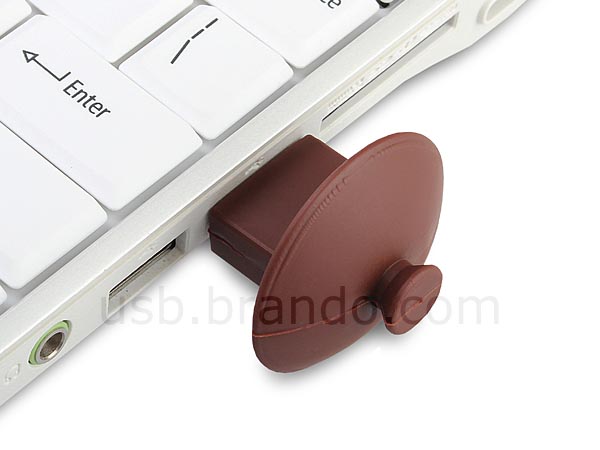
Apparently the special teacup can’t be used to hold your KungFu tea, but if you like this kind of making tea with efforts, the following Chinese teacup shaped USB flash drive should be able to catch your eyes.
Chinese Teacup Shaped USB Flash Drive

This is an interesting USB flash drive that measures 64 x 64 x 40mm and weights 26g. As we can see from the images, the USB drive is shaped as a traditional Chinese teacup along with iconic coasting and an integrated cup mat. Of course, the mini teacup is constructed of plastic instead of purple clay in order to protect the built-in flash memory from bumps. Just disclosing the tea cover, you will see the hidden USB connector that allows to connect with your computer for data transmission.
Chinese Teacup Shaped USB Flash Drive
The Chinese teacup shaped USB flash drive is available in 5 storage capacities from 2GB to 32GB, and starting from $14 USD. If you’re interested, jump to Brando online store for more details.
Chinese Teacup Shaped USB Flash Drive
Additionally, if you need other options, you might like to check the toaster USB flash drives, spanner shaped USB flash drive and more via “USB flash drive” tag.

rtechinsane
,icodesource,SEO,SEO Tips,SEO Backlinks,SEO content,SEO tricks,SEO Engine,codes,gadgets,iphones,ipad,4G phones,geeks,reviews,database,DBMS,
warehouse,datamining,datawarehouse

iHome iD99 Dual Dock Speaker


iHome iD99 Dual Dock Speaker

We have introduced many nice dock speakers that allow you to enjoy your favorite music comfortably, but if you have multiple iOS devices, iHome iD99 dual dock speaker may be more suitable for you.
iHome iD99 Dual Dock Speaker

iHome’s iD99 is a multi functional docking station that measures 10.24 x 4.26 x 5.91 inches, weights 3.04 lbs, and designed for various iPad, iPhone and iPod. As we can see from the images, the docking station features portable, sleek design, and comes with two dock connectors for your two iOS devices, plus an integrated USB port, the dock speaker doubles as a charging station to feed up to three devices at once, moreover, the built-in stereo speaker system, and with adjustable EQ and Reson8 speaker chambers produces high quality sound for your favorite music, while the dual alarm featured alarm clock with snooze control wakes you up via alarms, music from your iOS devices, or FM radio. Apart from that, the 3.5mm audio input allows you to connect the stereo speaker system with other music players.
iHome iD99 dual dock speaker is priced at $129.99 USD. If you’re interested, jump to iHome official sitefor more details. Additionally, if you need other options, you might like to check IDAPT S1 wireless dock speaker and more via “dock speaker” tag.

The Coco Game Controller for Smartphones


The Coco Game Controller for Smartphones


We have introduced several nice game controllers designed for smartphones, while the latest finding is the following coco controller. If you’re curious, let’s go on checking.
The Coco Game Controller for Smartphones

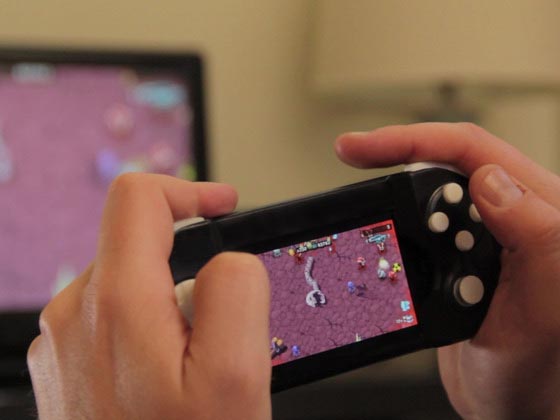
The coco controller is a portable mobile game controller designed for iPhone 4/ 4S, iPod touch 4G, upcoming iPhone 5 and Samsung Galaxy S3. As we can see from the images, the game controller features gorgeous portable design, and comes with a multi-axis directional pad, an analog stick. 4 action buttons and 2 triggers in order that you can use it to enjoy those exciting mobile games. All you need to do is just to connect the game controller with your smartphone via 3.5mm audio jack, and with an iPhone 4S or the new iPad and an Apple TV, you can also play those mobile games on a big screen. Apart from that, the coco gamepad requires no extra battery and Bluetooth, and doubles as a protective case to protect your smartphone from bumps and scratches.
The Coco Game Controller for Smartphones 
The Coco Game Controller for Smartphones
At present, over 30 mobile games are compatible with the coco controller, the number will be growing. The designers of the mobile game controller are raising fund on Kickstarter. Pledge $42 will let you own the game controller. If you’re interested, jump to Kickstarter official site for more details.

rtechinsane
,icodesource,SEO,SEO Tips,SEO Backlinks,SEO content,SEO tricks,SEO Engine,codes,gadgets,iphones,ipad,4G phones,geeks,reviews,database,DBMS,
warehouse,datamining,datawarehouse

Patchworks Alloy X Wood iPhone 4 Case


Patchworks Alloy X Wood iPhone 4 Case


Need a stylish way to protect your iPhone 4 or 4S? Take a look at Patchworks Alloy X Wood iPhone 4 case, maybe the combination of technology and nature can catch your eyes.
Patchworks Alloy X Wood iPhone 4 Case

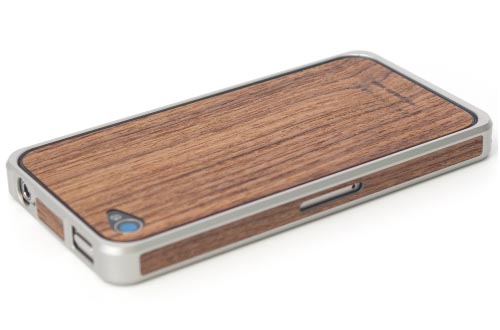
This is a well-designed protective case designed for iPhone 4 and iPhone 4S. The iPhone 4S caseconsists of three parts including a protective bumper made from aircraft-grade aluminum and Ebony wood, a genuine wood front plate and a genuine wood rear plate in order to protect your iPhone 4 or 4S from bumps and scratches in a stylish way, and the lightweight design provides you a comfortable and easy grip experience. Apart from that, the custom cutouts allow you access to all buttons and functions of your iPhone 4 or 4S, and the accompanying wood presentation box is perfect for a special gift.
Patchworks Alloy X Wood iPhone 4 Case
The Patchworks Alloy X Wood iPhone 4 case is available three types, each one is priced at $144.99 USD. If you’re interested, jump to Tekcases official site for more details.
Patchworks Alloy X Wood iPhone 4 Case
Additionally, if you need other options, you might like to check the leather iPhone 4 case, Alfa aluminum iPhone 4 case and more via “iPhone 4 case” tag.

rtechinsane
,icodesource,SEO,SEO Tips,SEO Backlinks,SEO content,SEO tricks,SEO Engine,codes,gadgets,iphones,ipad,4G phones,geeks,reviews,database,DBMS,
warehouse,datamining,datawarehouse

iLuv Snoopy Folio iPad 3 Case


iLuv Snoopy Folio iPad 3 Case

You can find out many nice gems to protect your new iPad, but if you’re the fan of the cute cartoon dog, iLuv Snoopy iPad 3 case should be able able to draw your more attention.
iLuv Snoopy Folio iPad 3 Case

This is a folio styled protective case designed for the new iPad and iPad 2. As we can see from the images, the new iPad case features a classic cartoon character from comic strip Peanuts, Snoopy, and with a beautiful background. In addition to protecting your iPad 3 or iPad 2 from bumps and scratches, the iPad 3 case also doubles as a versatile iPad stand that supports both portrait and landscape viewing modes along with multiple tilt angles for optimal viewing positions. Apart from that, the buttons and functions of your iPad are accessible via custom cutouts.
iLuv Snoopy Folio iPad 3 Case

Element Case Wood iPad 3 Case


Element Case Wood iPad 3 Case


Apparently Element Case known as its aluminum iPhone 4 case series gave us a surprise. They has focused another nice material and popular mobile device, and released their latest wood iPad 3 case. If you’re also curious, let’s go on checking.
Element Case Wood iPad 3 Case

This is a form-fitting, strong protective case designed for both iPad 2 and the new iPad. As we can see from the images, the new iPad case features ultra thin, lightweight design and a solid dual-layer construction that consists of a warm natural wood veneer and a genuine carbon fiber in order to protect the iPad 2 or iPad 3 from bumps and scratches. Apart from that, the custom cutouts allow you access to all functions and buttons of your iPad 2 or iPad 3.
Element Case Wood iPad 3 Case
The wood iPad 3 case is priced at $89.99 USD. If you’re interested, jump to Element Case for more details.
Element Case Wood iPad 3 Case
Additionally, if you need other options, you might like to check the wooden iPad 3 case and more via “iPad 3 case” tag.

rtechinsane
,icodesource,SEO,SEO Tips,SEO Backlinks,SEO content,SEO tricks,SEO Engine,codes,gadgets,iphones,ipad,4G phones,geeks,reviews,database,DBMS,
warehouse,datamining,datawarehouse

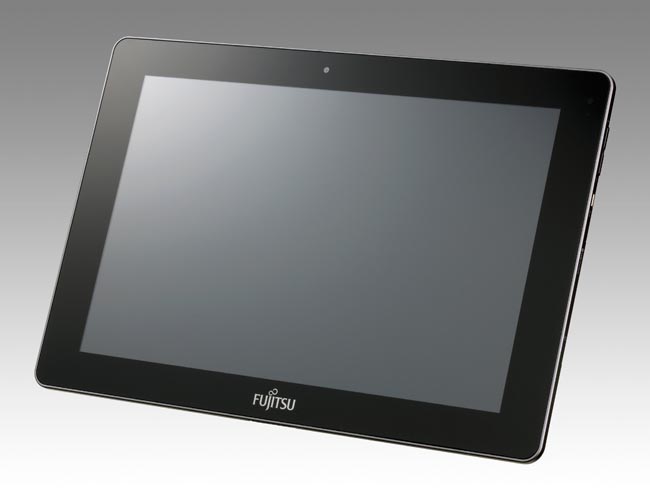
Fujitsu Stylistic M532 Android Tablet


Fujitsu Stylistic M532 Android Tablet

Fujitsu America recently released a new Android tablet: Stylistic M532. If you’re considering a fully featured Android tablet for entertaining and gaming, let’s go on checking.
Fujitsu Stylistic M532 Android Tablet

Fujitsu Stylistic M532 is a 10.1-inch Android tablet that measures 10.3 x 6.9 x 0.35 inches and weights 1.23 lbs. The Android tablet runs on Google Android 4.0 Ice Cream Sandwich mobile operating system, and comes with NVIDIA Tegra 3 quad core ARM Cortex A9 1.4GHz processor, 1GB RAM, 32GB eMMC internal storage, 10.1-inch touchscreen TFT LED capacitive display with 1280 x 800 pixels resolution, a 2-megapixel front facing webcam and a 8-megapixel rear autofocus camera with flash, moreover, other specs also include a pair of built-in speakers, digital microphone, Bluetooth, WiFi, USB port, microSD card slot, and 3170mAh rechargeable battery for approx 8.4 hours of video playback.
Fujitsu Stylistic M532 Android Tablet
Fujitsu Stylistic M532 Android tablet is priced at $549 USD. If you’re interested, jump to Fujitsu Americafor more details.

Gear4 StreetParty Wireless Portable Speaker


Gear4 StreetParty Wireless Portable Speaker


Gear4 recently released a new wireless portable speaker: StreetParty Wireless. If you want to enjoy your favorite music in a wireless way, let’s go on checking.
Gear4 StreetParty Wireless Portable Speaker

StreetParty Wireless is a portable Bluetooth wireless speaker. As we can see from the images, thewireless speaker features compact, sleek design, and comes with built-in Bluetooth 2.1 technology in order to connect with your smartphone, tablet and any Bluetooth-enabled music device and bring you loud and clear acoustics, while the integrated 3.5mm audio input also allows the bluetooth speaker to connect with any music player with 3.5mm audio jack. Apart from that, the built-in rechargeable battery offers you up to 8 hours of playback time.
Gear4 StreetParty Wireless Portable Speaker
StreetParty Wireless portable speaker is priced at $79.99 USD. If you’re interested, jump to Gear4 official site for more details. Additionally, if you need other options, you might like to checkboomSTREAM wireless speaker and more via “wireless speaker” tag.

rtechinsane
,icodesource,SEO,SEO Tips,SEO Backlinks,SEO content,SEO tricks,SEO Engine,codes,gadgets,iphones,ipad,4G phones,geeks,reviews,database,DBMS,
warehouse,datamining,datawarehouse

World of Warcraft: Mists of Pandaria Cinematic Game Trailer


World of Warcraft: Mists of Pandaria Cinematic Game Trailer


Mists of Pandaria, the latest expansion of World of Warcraft is around the corner. Now Blizzard has released a cinematic game trailer at ongoing GamesCom 2012. If you’re a fan of WOW, let’s go on checking.
World of Warcraft: Mists of Pandaria Cinematic Game Trailer

In the cinematic trailer, the fighting between a human soldier and Orc warrior will guide us to the mysterious land of Pandaria, of course, also including the new playable race, the Pandaren. The added contents in the new expansion also include a new character class, the Monk, new vanity pet system along with pet battle system, new system of tiered talents, new dungeons and raids and etc. World of Warcraft: Mists of Pandaria will launch on September 25 this year. At present, Amazon has started accepting the preorders of the new expansion. After the break, check out the latest cinematic game trailer.

rtechinsane
,icodesource,SEO,SEO Tips,SEO Backlinks,SEO content,SEO tricks,SEO Engine,codes,gadgets,iphones,ipad,4G phones,geeks,reviews,database,DBMS,
warehouse,datamining,datawarehouse

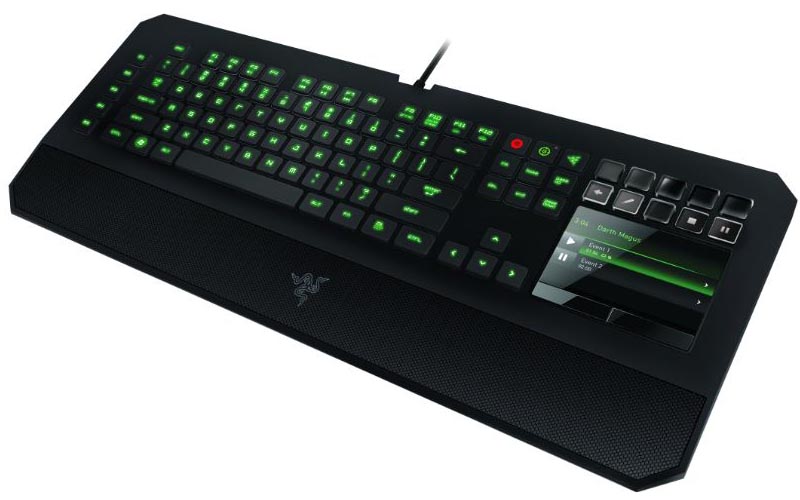
Razer DeathStalker Ultimate Gaming Keyboard Announced


Razer DeathStalker Ultimate Gaming Keyboard Announced

Razer recently announced its latest gaming keyboard: DeathStalker Ultimate. If you’re also curious about the gaming keyboard with all-new Switchblade User Interface, let’s go on checking.
Razer DeathStalker Ultimate Gaming Keyboard Announced

The DeathStalker Ultimate is a unique designed professional gaming keyboard. As we can see from the images, the gaming keyboard features Razer’s revolutionary Switchblade User Interface that consists of a customizable LCD trackpad and LED keypad combo. The unique interface allows you to customize up to 10 dynamic adaptive tactile keys for commands, skills, macros and spells for different video games, and with the help of Razer’s Synapse 2.0 software, each key shows you a graphical interface for intuitive identification.
Razer DeathStalker Ultimate Gaming Keyboard Announced
Moreover, the LCD panel can display other applications such as YouTube, Facebook, Twitter, Gmail, Numpad, Game Timer and more for convenient operation. Apart from that, the professional gaming mouse also features fully programmable and tri-color backlit keys, 1000Hz Ultrapolling, 5 additional macro keys, anti-ghost capacity for up to 10 simultaneous key presses and fixed wrist rest.
Razer DeathStalker Ultimate Gaming Keyboard Announced
The DeathStalker Ultimate gaming keyboard will be available on September this year for $249.99 USD. If you’re interested, jump to Razer official site for more details.

rtechinsane
,icodesource,SEO,SEO Tips,SEO Backlinks,SEO content,SEO tricks,SEO Engine,codes,gadgets,iphones,ipad,4G phones,geeks,reviews,database,DBMS,
warehouse,datamining,datawarehouse

Recent Posts